

Use iPOSpays Freedom to Design (FTD) to keep the payment experience inside your website or application while iPOS handles payment-data tokenization.
You do not have to send the customer to the iPOS Hosted Payment Page. iPOSpays offers Freedom to Design (FTD), a JavaScript-based checkout integration intended for custom, branded payment forms. FTD generates a one-time paymentTokenId, which your server can then submit through the iPOS Transact API.
Hosted checkout vs. inline checkout
The iPOS Hosted Payment Page (HPP) is a prebuilt payment experience. It can be useful when speed and simplicity matter most, but the merchant has less control over the checkout interface.
Freedom to Design is intended for applications that want the payment form to feel native to the rest of the website or app.
Option | Customer experience | UI control | Best fit |
|---|---|---|---|
Hosted Payment Page | Uses an iPOS-hosted payment experience | Limited | Fast deployment |
Freedom to Design | Payment form stays inside your checkout | High | Custom branded checkout |
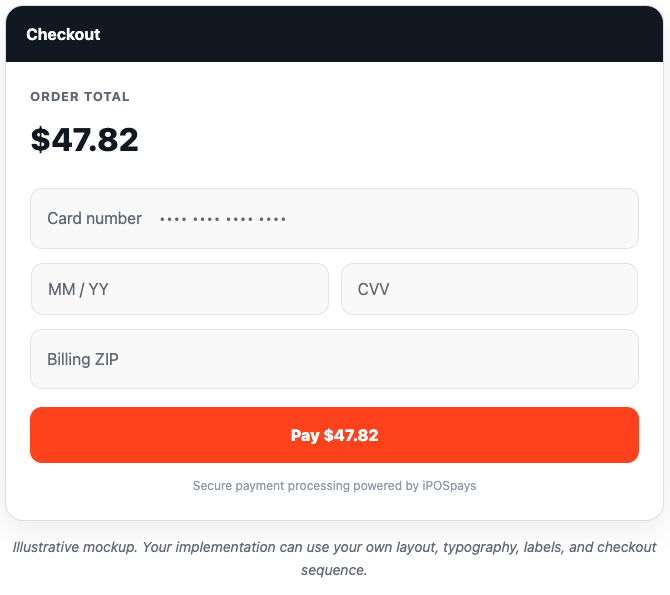
What the customer can see
The payment portion can look like the rest of your application instead of appearing to hand the customer off to another payment site.
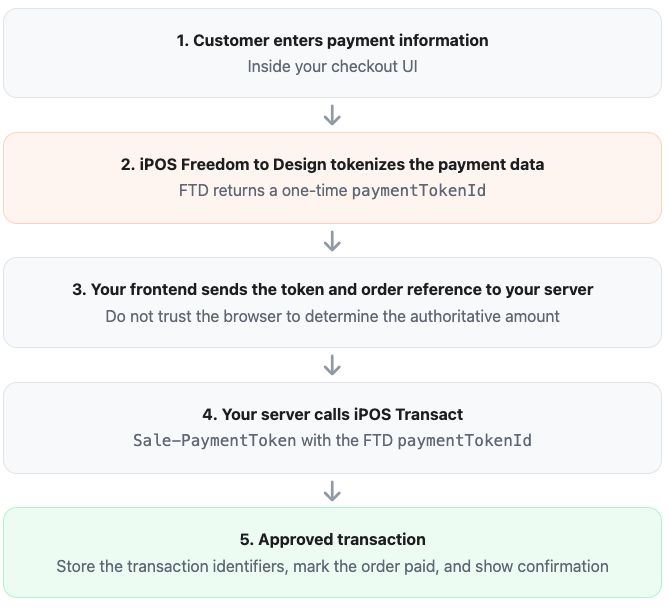
How the payment flow works
The two iPOS components you need
1. Freedom to Design (FTD)
FTD is the browser-side component. iPOS describes it as a JavaScript framework for collecting sensitive payment information while allowing the merchant to retain control of the checkout look and feel.
When the customer submits the payment form, FTD generates a unique paymentTokenId.
Important token rules
The FTD
paymentTokenIdis single-use.According to current iPOS documentation, an unused payment token expires after 24 hours.
The token is passed to the iPOS Transact API to complete the sale or pre-authorization.
2. iPOS Transact
Your server uses iPOS Transact to execute the transaction. For the FTD flow, the relevant sale operation is Sale-PaymentToken.
A simplified request concept looks like this:
{ "merchantAuthentication": { "merchantId": "MERCHANT_TPN", "transactionReferenceId": "YOUR_UNIQUE_ORDER_REFERENCE" }, "transactionRequest": { "amount": "4782", "transactionType": 1, "paymentTokenId": "ONE_TIME_FTD_TOKEN" }}Note: This example is intentionally simplified. Use the current iPOS API specification for the exact authentication headers, optional preferences, AVS fields, transaction types, and production endpoint.
Recommended application architecture
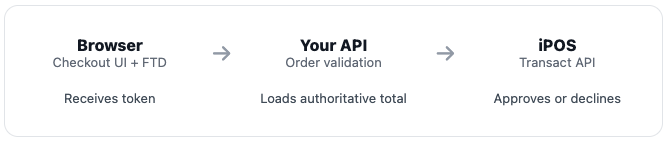
Do not let the browser decide what amount to charge.
A customer can modify browser requests. Your backend should load the order, verify prices, tax, discounts, fees, and tip, calculate the authoritative total, and only then submit that amount to iPOS.
Example frontend-to-backend flow
After FTD returns a payment token, your application can send only the information your server actually needs:
{ "orderId": "ORD-827341", "paymentTokenId": "65564fda-..."}Your server should then:
Load the order from your database.
Confirm the order has not already been paid.
Recalculate the final amount from server-side data.
Create or reuse a safe, unique transaction reference.
Submit the FTD token to iPOS Transact.
Record the processor response, transaction ID, RRN, approval code, and other useful reconciliation data.
Mark the order paid only after a confirmed approval.
Return the checkout result to the browser.
Initial iPOS setup
Before FTD can be used, the current iPOS documentation calls for merchant-side setup in the iPOS portal:
Identify the merchant's applicable TPN.
Generate the merchant's Merchant Key / Ecom Token.
Add the website domain under Whitelisted Domains.
Load the appropriate Freedom to Design JavaScript integration in the checkout application.
Configure the server-side iPOS Transact authentication separately.
Multi-merchant platforms: If your software serves multiple merchant accounts, treat the merchant payment configuration as tenant-specific. The TPN, applicable credentials, enabled processor, and approved checkout domain must correspond to the merchant whose order is being processed.
Supported payment methods
Current iPOS Freedom to Design documentation lists support for:
Credit / Debit | Apple Pay | Google Pay | ACH |
Processor support can vary by payment method. At the time this article was prepared, iPOS lists card support for TSYS, Fiserv North, Fiserv Omaha, Worldpay, EPX, and Elavon. Verify the merchant's actual iPOS configuration before promising a specific payment method.
Card-on-file and reusable tokens
The FTD paymentTokenId itself should not be treated as a reusable stored-payment token. It is designed for one-time use.
Current iPOS documentation states that a transaction using the FTD payment token can return a reusable Card Token / iPOS Token when the applicable token request option is enabled. That reusable token can be stored according to your application's security and business requirements and used for supported future transactions.
Think of the two tokens differently:paymentTokenId = one-time bridge from the inline checkout to the initial transaction.Card Token / iPOS Token = reusable payment credential returned by iPOS for supported future transactions.
PCI and security considerations
iPOS positions FTD as a way to reduce the merchant's PCI DSS burden while keeping control of the checkout design. That does not mean a custom integration can ignore security responsibilities.
Never log card numbers, CVV values, or other sensitive authentication data.
Keep server-side iPOS API secrets and authentication tokens out of browser code.
Use HTTPS for the entire checkout experience.
Use domain whitelisting exactly as required by iPOS.
Use a restrictive Content Security Policy where practical and explicitly allow only the iPOS resources your integration requires.
Prevent double-submit behavior on the payment button.
Design safe retry behavior for network timeouts so a lost response does not create a duplicate charge.
Keep transaction references unique and useful for reconciliation.
Confirm your final PCI scope with the acquiring/processing program and your compliance resources.
Handling failures correctly
Scenario | Recommended behavior |
|---|---|
FTD tokenization fails | Keep the order unpaid and let the customer correct the payment information. |
Processor decline | Show a safe decline message and allow another payment attempt. |
Token already used or expired | Generate a new FTD payment token; do not reuse the old one. |
Timeout after transaction submission | Check transaction status before blindly retrying the sale. |
Customer double-clicks Pay | Disable or lock the submit action while the payment attempt is in progress. |
A better checkout experience
Because the payment form can remain part of your application, you can build a checkout sequence that feels continuous:
Cart → Order Type → Customer → Tip → Payment → Confirmation
This avoids the visual and behavioral break that occurs when the customer is sent to a separate third-party checkout page and then returned to the merchant site afterward.
Developer implementation checklist
Confirm the merchant processor is supported by FTD.
Obtain the correct merchant TPN.
Generate the Ecom Token / Merchant Key.
Whitelist the production checkout domain.
Integrate the current FTD JavaScript library.
Generate a one-time
paymentTokenId.Send only the token and order reference to your backend.
Recalculate the authoritative total server-side.
Submit the transaction through iPOS Transact.
Store the transaction response needed for support and reconciliation.
Handle declines, expired tokens, timeouts, and duplicate-submit protection.
Test sandbox and production configurations separately.
Frequently asked questions
Does the customer have to leave our website?
No. Freedom to Design is intended to support a custom checkout experience inside the merchant's website or application.
Is Freedom to Design the same thing as the Hosted Payment Page?
No. HPP is the prebuilt hosted checkout experience. FTD is the customizable JavaScript integration for applications that want to own the checkout UI.
Does FTD itself charge the card?
The key role of FTD in this flow is payment-data collection and tokenization. The generated paymentTokenId is then submitted through iPOS Transact to perform the sale or pre-authorization.
Can I reuse the FTD payment token?
No. Current iPOS documentation identifies the FTD paymentTokenId as one-time use. Generate a new payment token for a new attempt when required.
Can I save a card for later?
Potentially. iPOS can return a reusable Card Token / iPOS Token for supported transaction flows. Store and use that token rather than attempting to retain the original FTD paymentTokenId.
Can the checkout include Apple Pay or Google Pay?
Yes. Current Freedom to Design documentation lists Apple Pay and Google Pay as supported payment methods, in addition to credit/debit cards and ACH. Merchant and processor configuration still determines actual availability.
Documentation note
iPOS documentation is actively evolving. The current Sale-PaymentToken documentation explicitly states that paymentTokenId is generated by Freedom to Design and passed to iPOS Transact. A more general iPOS Transact overview page contains older language describing token generation through other flows. For an FTD implementation, follow the current Freedom to Design and Sale-PaymentToken endpoint documentation and confirm any ambiguity with iPOS Developer Support.
Source references: Dejavoo/iPOSpays Developer Central — Freedom to Design, Freedom to Design API Docs, iPOS Transact, and Sale-PaymentToken documentation.
Article reviewed: August 27, 2026.
Tricera note: API capabilities and processor support can change. Validate production requirements against the current iPOSpays documentation before deployment.