

This article will specifically address some of the confusion created by having tip at time of purchase and fee-based programs built to cover the cost of accepting tips.
Fee on Tip Reconciliation for P-Line Batch Reports
Below is what the batch report will look like from any of the P-series devices:

Line Item Explanation of Batch Report
Total Batch: total of all base amounts, tips, and adjustments
Base Amount: total of just the initial dollar amount entered into the terminal (this would match POS sales report $10 burger = $10 base amount)
Total Tip: total of the amount of tip BEFORE any adjustment workflows.
Total w/o Tip: Total base plus base adjustment plus adjustments on tips - does not include tips.
Total Fee: Total of all fees collected on both base amounts and tip amounts
Total w/o Fee: Base amount plus tip amount not including any adjustments
Total w/o fee w/o tip: This is just the base amount again. If the merchant was collecting calculated taxes on the terminal, it would show here.
Now, let’s reconcile an actual batch.
Below you’ll find the receipts for six transactions included on the above report:

The receipts themselves don’t break anything down as they’re customer receipts. Also, for compliance, any adjustments aren’t itemized on the receipt.
Let’s break down the transactions:
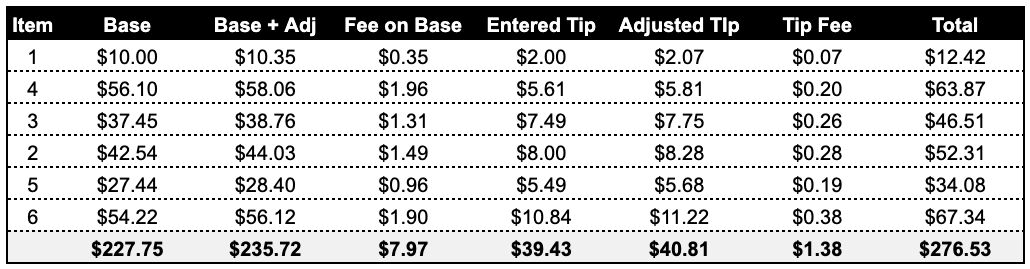
Each of the transactions from the receipts is summarized on the table above. As you can see, the totals for each column, for the most part, are visible on the batch report.
POS Reconciliation for P-Line Batch Reports
If you need to “line up” your point of sale reporting to the p-line batch report, you’re looking for “Base Amount”. This would be the amount that the POS totaled for the guest check or transaction.
Example: You ring up a hamburger for $10.00 and your point of sale applies a 7% sales tax. Your “base” amount in the p-line receipt would be $10.00 + $0.70 = $10.70. If you are running a 5% fee program, the terminal would take the base amount of $10.70 and apply the 5% to that amount to get to the Base + Adj of $11.24 ($10.70 + 5% of 10.70).