

If you are receiving the error below, it is because our system uses Spoofing to send emails to your prospects as if you were sending them directly.
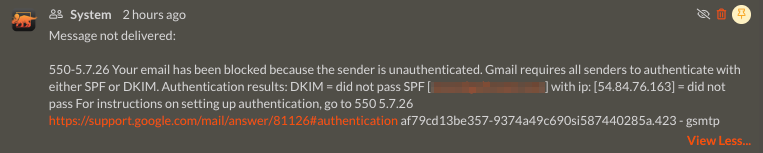
Gmail recipients specifically will have difficulty receiving spoofed emails without adjusting your DNS.
To ensure the highest deliverability, add the following records to your domain’s DNS settings:
SPF / Sender Policy Framework
Domains should only have one SPF record. So if you already have one, you’ll want to append the value below. If no SPF record exists, create it according to the information below:
Type: TXT
Current Value: v=spf1 +a +mx ~all
New Value: v=spf1 +a +mx include:_spf.iriscrm.com ~all
TTL: 1 hour / 3600
DKIM / DomainKeys Identified Mail
DKIM adds a digital signature to the email header. This signature is secured with public-key cryptography and can be verified using a public key published in your DNS records. BOTH of the records below ned to be added to your DNS configuration.
Type: CNAME
Host: iris._domainkey
Points to: dkim.iriscrm.com
TTL: 1 hour / 3600
Type: CNAME
Host: iris1._domainkey
Points to: dkim1.iriscrm.com
TTL: 1 hour / 3600
DMARC / Domain-Based Message Authentication, Reporting, and Conformance
DMARC helps Internet Service Providers prevent malicious email practices, such as domain spoofing used in phishing attempts.
Type: TXT
Host: _dmarc
Value: v=DMARC1; p=none; rua=mailto:dmarc-reports@iriscrm.com; ruf=mailto:dmarc-reports@iriscrm.com; fo=1
TTL: 1 hour / 3600
Frequently Asked Questions
Can I have more than one SPF record?
No. A domain should only have one SPF record. If you already have an SPF record, edit the existing record and add include:_spf.iriscrm.com.
Why do I need to add SPF, DKIM, and DMARC records?
These records help receiving email systems verify that Merchant Central is authorized to send emails on behalf of your domain. This can improve delivery rates and reduce the chance that emails are rejected or marked as spam.
Do I need to add both DKIM records?
Yes. Both DKIM CNAME records must be added to your DNS configuration.
How can I check whether my records are working?
ou can use MX Toolbox to check SPF and DKIM records. You can also use the CRM’s Email Domain Checker and the Email Metrics page to monitor email health and delivery performance.
Will DNS changes take effect immediately?
DNS changes may take time to propagate. The recommended TTL for the records in this article is 1 hour / 3600.