
Remove the battery cover from the back of the device.
Remove the battery and set aside.
Insert SIM card in the lower slot. Use the picture as a guide to ensure it is facing the correct way.
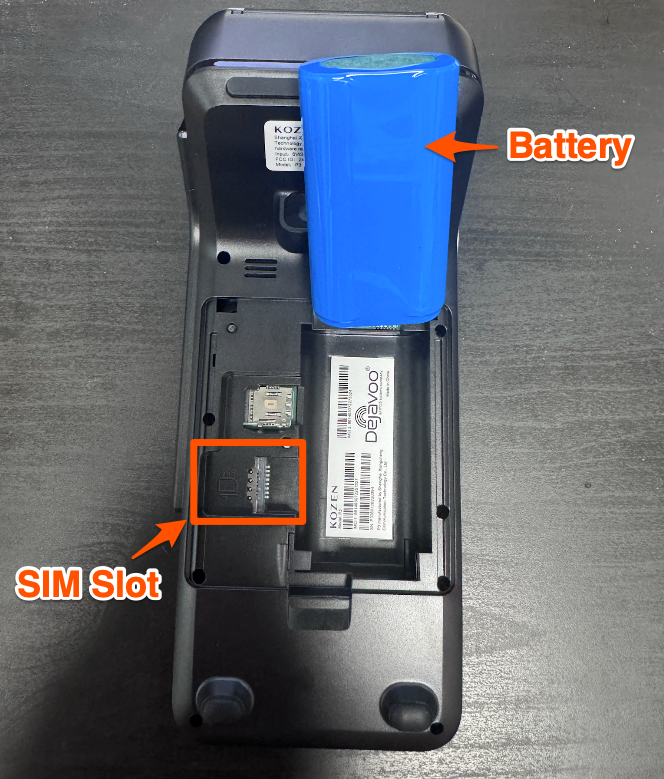
If the battery was fully removed, ensure it is reattached and that the pins are connected securely.
Replace the battery and put the cover back on.
Power on your terminal by pressing and holding the silver power button on the side of the device.
Connect your device to WiFi to do a Parameter update if you have not already.
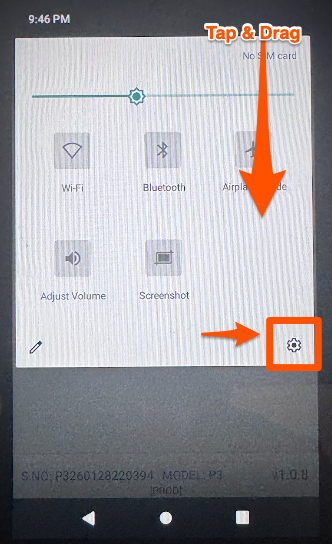
Using your finger, press and drag down from the top right of the screen to open the settings toolbar.
Tap the Gear Icon for Settings.
Choose SIM
Set Slot 2 to AT&T
Tap the three lines at the top right of the screen & select More
Tap Cellular Networks
Update APN to say broadband
Reboot your device
Turn off WiFi
Complete a test transaction on LTE

